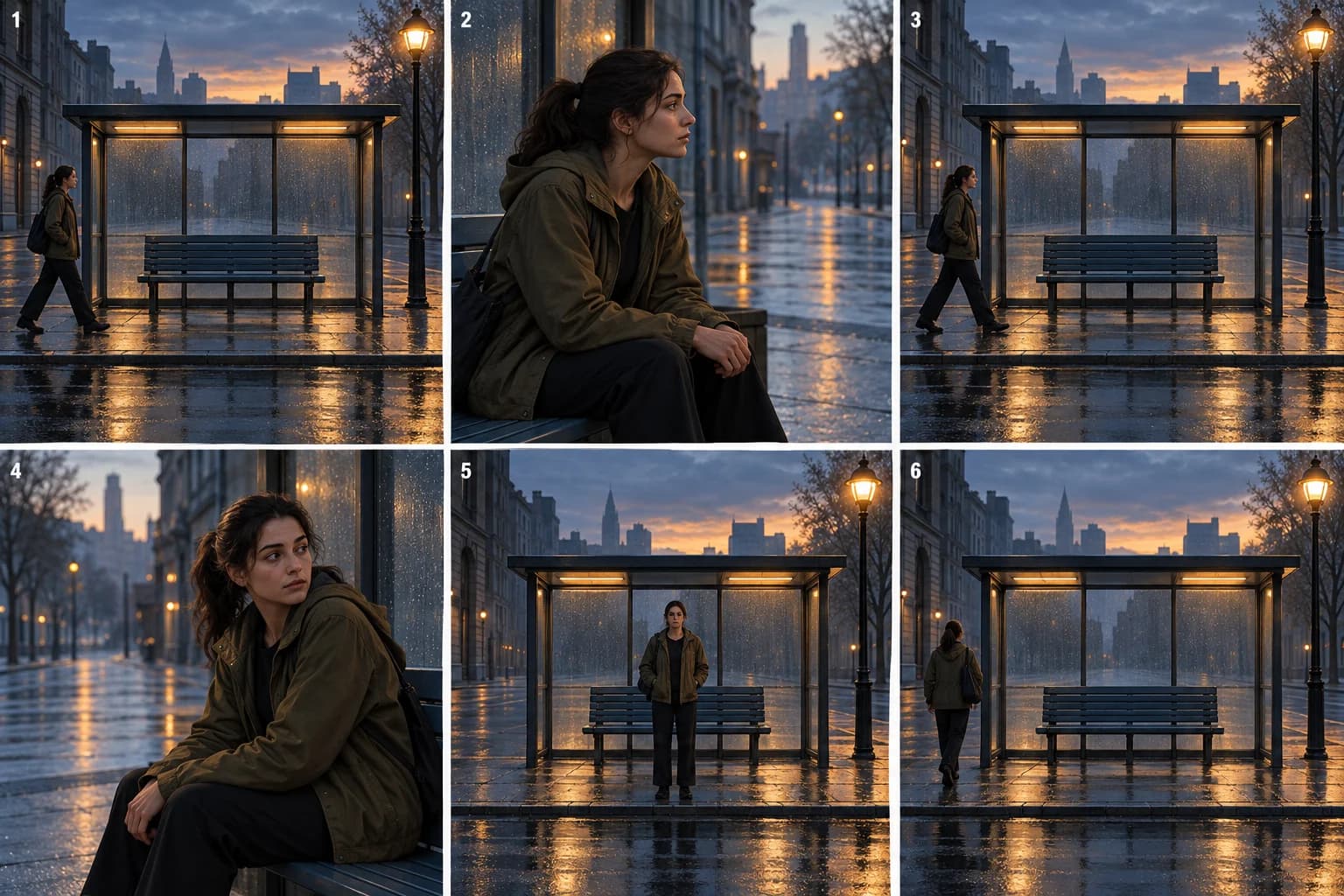
The second time you see a familiar street corner, you look for what changed. A narrative loop music video uses that expectation: repeat an image the viewer can recognize, then let a small difference move the story forward.
This is useful for a song about habit, indecision or a conversation someone keeps replaying. It differs from making a short clip loop seamlessly. If that is your task, start with the Spotify Canvas maker.
Back at the Same Stop is a fictional teaching treatment. Its AI-generated illustrations show proposed scenes, not completed video results. The directions are untested. The six beats describe a story structure; they are not six measured clips or a fixed song timeline.
The treatment: Back at the Same Stop
A woman walks into a bus shelter on an empty street at dawn. She looks down the road, then moves on. When the song returns to a familiar musical phrase, the same wide composition returns: she is entering the shelter from the same side again.
At first, the recurrence could be a memory. On the next return, she seems to notice it too. Instead of immediately moving on, she pauses and considers the routine. The street remains ordinary. There is no portal or clock to explain what is happening.
The final return begins with the same shelter, but she stops in its center. She no longer passes through the frame as expected. After a pause, she leaves in the opposite direction. The location has not changed; her response to it has.
The visual promise is simple: you will recognize the setup, but you will not get the same answer every time.
First establish the pattern, then disturb it
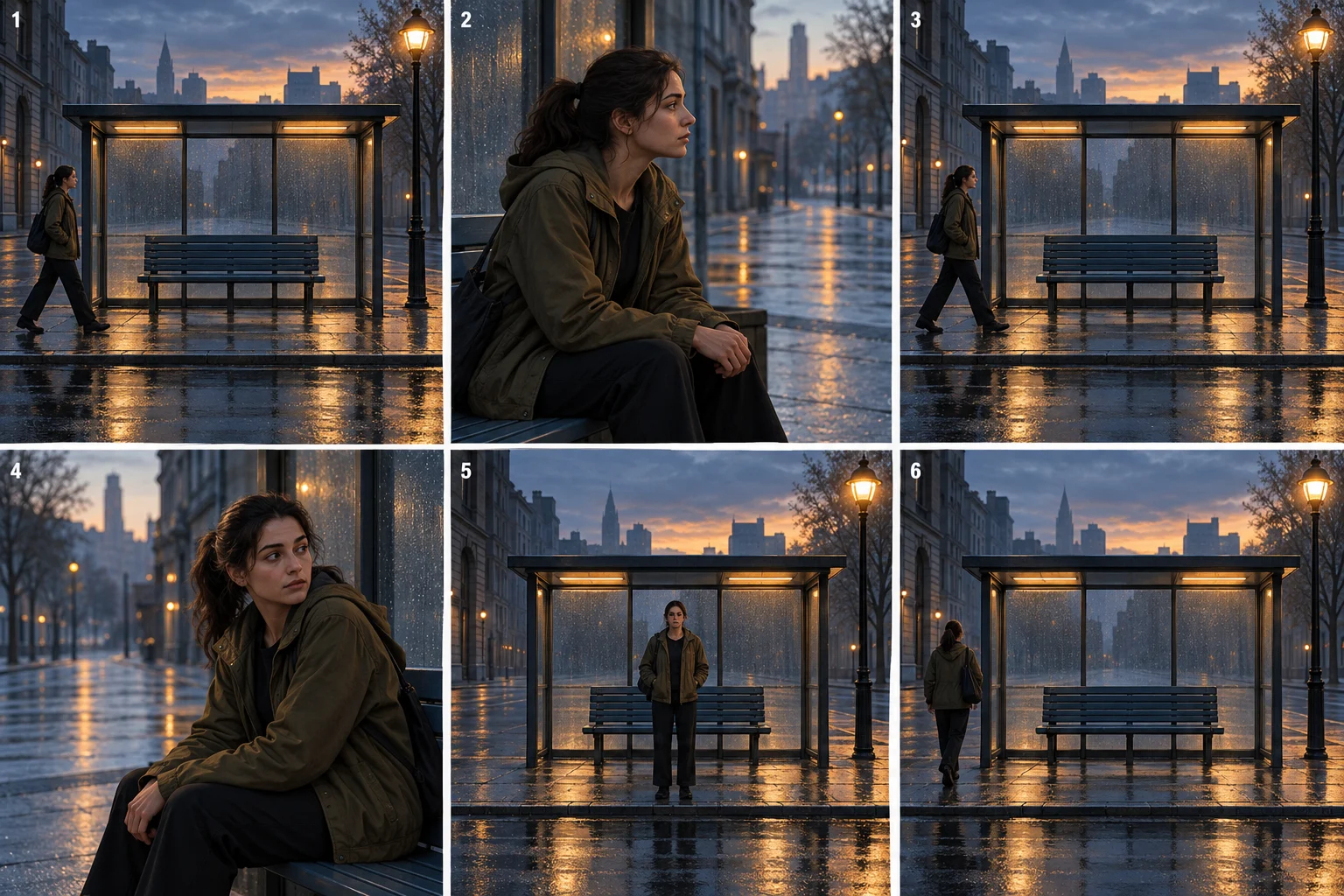
These are concept illustrations. Select a panel to open the full board. The recurring wide frame is the anchor; the closer views let us read changes in attention.
1. Make the first arrival easy to remember
Use a clear wide view: shelter, bench, streetlamp and the woman entering from the left. Let the audience read the space. A busy montage would make it harder to recognize the return later. Keep the direction of travel visible rather than cutting away halfway through the entrance.
2. Give the waiting a point of view
Move closer as she looks down the road. This establishes what she expects without requiring a bus, another actor or a phone message. If the song needs a vocal performance here, plan that separately; the illustrated portrait is an observational story shot.
3. Repeat enough for the viewer to recognize it
Return to the wide shelter view when the music gives you a meaningful recurrence. Keep camera position, outfit and street landmarks familiar. Change a small part of her behavior: this time her attention can be more direct, less hopeful or more impatient. Choose one interpretation, not all three.
4. Let the character catch up with the audience
Use a second quiet portrait instead of another entrance. Her pause gives the audience time to consider the routine with her. Let the expression and held posture carry this beat. A new visual effect would compete with the small change in attention.
5. Keep the frame, break the behavior
The same composition returns, but she stops at its center. The audience has learned to expect her to pass through. Holding the image now makes the absence of that action meaningful. Avoid adding a new location at the moment the repeated one is finally paying off.
6. End with a decision the viewer can see
She leaves toward the left, reversing the established direction. The last image can hold on the bench after she goes. The treatment does not have to explain whether the earlier returns were literal events or memories; it does need to make the final choice readable.
Decide what must be identical
A recurring composition and an identical piece of footage are different requirements. For recognition, a stable arrangement of shelter, bench, lamp and performer may be enough. For a literal repeat, a newly generated version can introduce unwanted differences.
If you need exactly the same footage, reuse an approved clip in an editor that supports that operation. Do not spend another generation expecting the same prompt to recreate it perfectly. VibeMV's shot plan is useful for preparing the distinct scenes; this example does not claim a one-click narrative-loop or clip-duplication control.
Before production, write two short lists: fixed and changed. In this example, the frame, costume and time of day are fixed. Gaze, posture and exit direction change. If the weather, coat, bench and camera angle also change, the audience may read a montage rather than a return.
Give VibeMV the repeating structure
Set the lead in Main character. In Preferences → Story direction, describe the repeated composition and the change in behavior:
One woman in an olive jacket returns to the same blue bus shelter
at dawn. Repeat the wide view with bench centered and lamp at right.
First she arrives from the left and looks down the road. On a later
return she pauses and considers the routine. Finally she stops at
center, then leaves left.
Keep the street, outfit and morning light consistent. Use separate
shots and cuts; no portals, clock effects or duplicate people.
Review the Creative plan rather than assuming a phrase such as “repeat the shot” creates an exact duplicate. For an anchor view, put the room or street layout and framing in the Image prompt. In the Workspace, its editing box in the Image step is labeled Generate image.
Wide frontal view of the established blue bus shelter at dawn.
Bench centered, streetlamp at right, wet empty street. The selected
woman in an olive jacket stands at the left edge of the shelter.
Keep the entire shelter visible.
Put the action in the optional Video prompt, for example: “She takes one step into the shelter and looks to the right. Camera remains still.” For the final variation, change the starting pose and action deliberately. Check each Start frame and the resulting motion before building the full edit. Planning is free; image and video generation use credits.
Adapt the recurrence to your song
A kitchen table, rehearsal doorway or empty stair landing could replace the shelter. Pick a place with a clear entrance, an action the viewer can learn, and an exit that can change. A lyric repeating the same question could meet the same wide frame, while the performance underneath it becomes less certain.
This approach is weaker when nothing changes on the return. If the song calls for an unresolved cycle, make that the intentional ending: the final arrival repeats the first, and the audience understands that the pattern continues.
For a different kind of repetition, compare a recurring object whose meaning changes. For placing the returns on a real timeline, use the storyboard guide.
Frequently asked questions
What is a narrative loop in a music video?
A narrative loop returns to a recognizable event or situation. Each return reveals a difference, and the ending can break or accept the pattern. It is a storytelling structure, not necessarily a seamless video loop.
Will repeating an AI prompt produce an identical shot?
No. Repeated wording does not guarantee identical framing, identity or motion. If the edit needs exactly the same footage, reuse an approved clip in an editor that supports that operation. Use a new generation when the image itself needs to change.
Compare the treatment examples, or start a project from your song.
More Posts
Dreamlike music video: a surreal treatment with a clear story
Plan a dreamlike music video that holds together. Follow a corridor-to-sea concept using recurring shapes, a clear journey and six illustrated beats.
One-room music video: a performance treatment example
Build a one-room music video around one performer. Follow a six-beat treatment using framing, light and movement, then adapt it in VibeMV.
Retro music video: build a look that belongs to the story
Plan a retro-inspired music video through a record-shop story. Connect props, lighting and framing with six illustrated beats and practical VibeMV directions.