8 sec / 9:16
Shorts-ready dance hook
Turn a chorus, drop, or repeated lyric into a vertical dance clip that reads clearly on TikTok, Reels, and Shorts.
VibeMV Dance Mode creates short dance shots from a song moment and one clear performer reference. Use them as hooks or MV inserts, then assemble with normal or lip-sync shots — not a full-song choreography render.
Create short dance video shots from a song segment and one performer reference. Use them as editable hooks for a full music video, TikTok, Reels, or Shorts.
10 sec / 16:9
See Dance Mode in action
Use these examples to judge the actual output: a vertical social hook, a widescreen chorus insert, a reference-led performer result, and a longer short-form dance sample.
Turn a chorus, drop, or repeated lyric into a vertical dance clip that reads clearly on TikTok, Reels, and Shorts.
Add a choreographed 16:9 moment between cinematic scenes for YouTube, website launches, or full-song music-video edits.
Use one clear performer or character reference to keep the dancer, outfit, and framing consistent across a focused Dance Mode shot.
Test a longer short-form Dance shot when the release needs more movement than a quick hook but still stays focused.
Image to dance video
Dance Mode works best when the shot has a clear subject and a focused creative direction. Upload the performer image, describe the movement, then review the generated video before adding it to the full music-video edit.
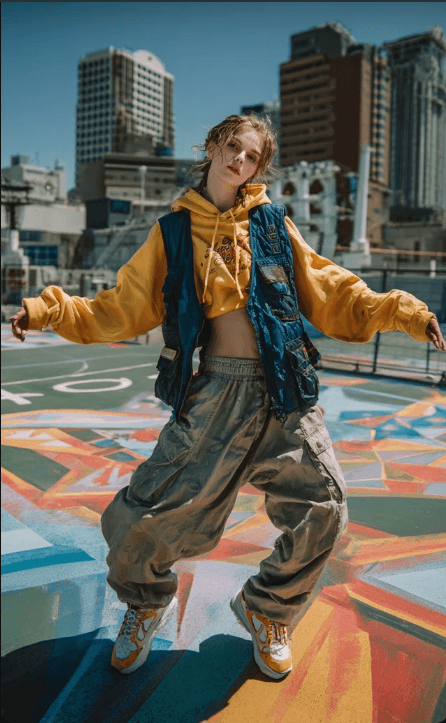
One dancer, visible outfit, clean vertical framing.
Pop chorus dance on a rooftop court.
One simple visual direction is enough for a focused Dance Mode shot.
Review it as a hook, social cut, or MV segment.
Choose the workflow
Generate a focused 9:16 Dance shot from the chorus, drop, or repeated lyric, then post it as a short-form cut.
Use one rights-safe performer or character reference so the Dance shot has a clear subject to move.
Use Dance Mode for one hook, chorus, drop, or dance break, then combine it with normal scenes and optional lip-sync shots.
Use the one-time free credits for a short test. Full songs or repeated Dance attempts need paid generation credits.
Workflow
Choose the hook, chorus, drop, dance break, or strongest social cutdown moment first.
Use one clear main performer or character. Avoid crowded frames, tiny subjects, celebrity likenesses, and references you cannot use publicly.
Render a 4-10 second Dance Mode segment and review motion, framing, subject clarity, and platform fit.
Musicians and creators who need a choreographed hook, chorus, drop, image-to-dance style performer shot, or short social dance clip inside a music-video project.
A short song moment plus one clear main performer or character reference. Crowded, tiny, or unclear subjects may be rejected by preflight. Use the full VibeMV workflow on every tier with MP3, WAV, AAC, M4A, FLAC, or AIFF files from 3 seconds to 7 minutes, up to 100MB. How much you can generate depends on available credits.
720p Dance Mode shots at 24fps for 16:9 or 9:16 music-video workflows.
Next step
Start from the main VibeMV workflow when the goal is a complete song-to-MV project.
Review real VibeMV outputs before deciding where Dance Mode shots fit in your music video.
Use lip sync for vocal closeups and Dance Mode for choreographed movement shots.
See how to choose the song moment, reference, credit budget, and final MV placement.
Plan vertical Dance hooks for short-form music-video posts.
Estimate 12 credits/sec Dance costs before longer tests.
Choose one clear performer or character reference for stronger Dance shots.
Check subscription credits and plan the cost of short Dance tests before longer renders.
FAQ
It is a workflow for creating short choreographed shots that fit inside a music video. VibeMV Dance Mode focuses on a song segment and one clear performer or character reference rather than a generic dance meme or full-song choreography promise.
Yes, when you have the right to use the image and the photo shows one clear performer or character. VibeMV Dance Mode is closer to a reference-led photo-to-dance video AI workflow than a face-swap or group-choreography tool.
Yes. Plan the strongest hook, chorus, or drop as a short 9:16 Dance Mode shot, review the result, then export it as part of a vertical music-video workflow for TikTok, Reels, or Shorts.
VibeMV includes one-time free credits that can help you test a short workflow. If you are searching for an AI dance video generator free option, treat those credits as a small test because Dance Mode uses paid generation credits at 12 credits per generated second.
No. Treat Dance Mode as a short creative shot generator for hooks, drops, dance breaks, or social cutdowns, not a guarantee of full-song choreography or exact multi-person dance direction.
We use cookies for essential site features and optional analytics.We use cookies to enhance your experience. By continuing to visit this site you agree to our use of cookies. Cookie Policy